Roles and what they can do
What Admins, Members, Guests and project Leads can each see and do.
2 min read · Updated Nov 6, 2026
Everyone in a company has one role: Admin, Member or Guest. An Admin picks it when they send the invite and can change it later in Settings, People.
On top of that, each project can have one Lead.
Company roles
- Admin: everything, including company settings, people and roles.
- Member: works cards, runs the timer and approves their own day.
- Guest: an outside contractor who only sees the projects they're added to.
| What | Admin | Member | Guest |
|---|---|---|---|
| See projects | All of them | The ones they're on, plus a list they can join | Only the ones they're on |
| Work cards (add, move, edit) | On any project | On projects they're on | On projects they're on |
| Make a project | Yes | Yes | No |
| Ask to join a project | Not needed | Yes | No, they must be added |
| Be a project Lead | Yes | Yes | No |
| See Settings, People | Yes, and change it | Yes, read-only | No |
| Change company settings and Time rules | Yes | No | No |
| Connect Sredify, see History | Yes | No | No |
| Restore an archived project | Yes | No | No |
Admins and the timer
Admins can open and edit cards on any project. To log time on a project's cards, they add themselves to that project first, like everyone else.
The project Lead
The person who makes a project becomes its Lead. For example, Sam is the Lead of ROUTE.
The Lead and Admins can:
- Say yes or no to people asking to join (Let in or Say no on the project's People tab).
- Add people with Add someone and take them off with Take off.
- Change the Lead with Change Lead.
- Change the project's Settings, and archive it.
- See the Not sure flags on the board: cards someone marked Not sure about SR&ED, for the Lead to settle.
Only Admins and Members on the project can be Lead. If the Lead is turned off, made a Guest, or taken off the project, it has no Lead until an Admin picks one. Until then, Admins answer its requests. A Lead who wants to leave must make someone else the Lead first.
Ask to join
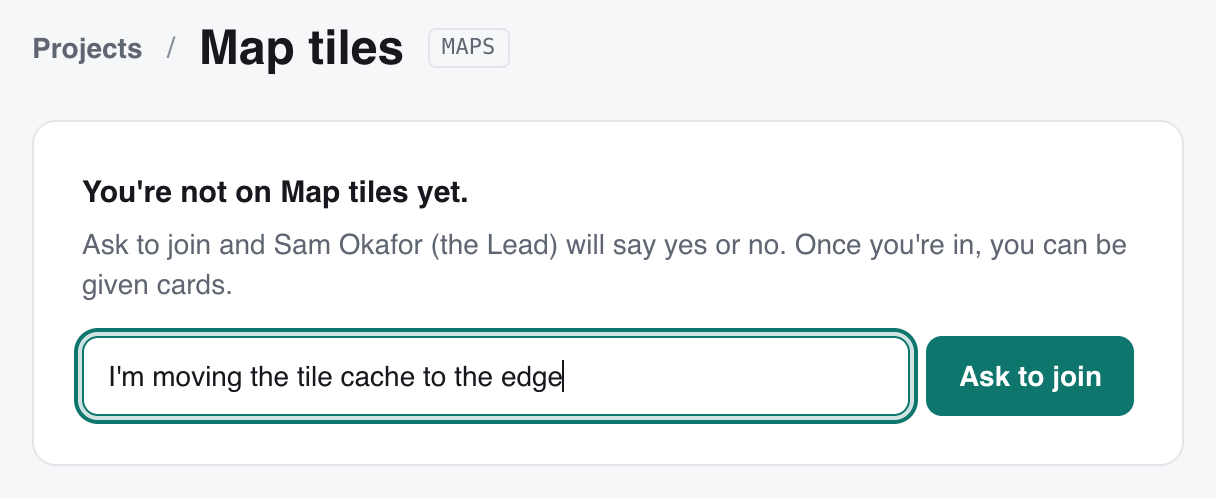
When a Member opens a project they're not on, they see You're not on the project and an Ask to join button. They can add a one-line reason.
Click Ask to join
Priya opens
ROUTEand types why, like "I'm fixing the GPS drift".Wait for a yes
Her request shows Asked, waiting for a yes. She can click Take back to cancel it.
The Lead decides
Sam sees the request on the project's People tab and clicks Let in or Say no.
Guests can't ask. The Lead or an Admin adds them.