Docs › Extensions › VS Code
SR&ED notes from the editor
Right-click a line to note an obstacle, something you tried, or something you learned.
1 min read · Updated Nov 6, 2026 · Extension 0.1.3
On this page
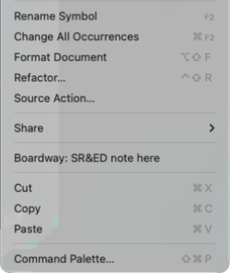
Right-click the line
Choose Boardway: SR&ED note here.
Pick the kind
Obstacle, Tried or Learned.
Write one line
Press Enter to save it on your running card.

Boardway keeps the file's path in the repo and the line number, never the code.
You can also use SR&ED note... from the status bar menu for a note that isn't about one line. Notes show on the card page. See SR&ED notes for which ones go to Sredify.