Docs › Extensions › VS Code
The status bar
What the Boardway item at the bottom of the editor shows, and what its menu does.
1 min read · Updated Nov 6, 2026 · Extension 0.1.3
When no timer runs
The status bar suggests the card for the branch you're on. Typing never starts a timer by itself: it only tells Boardway you're still at work.

While the timer runs
You see the card and the time, like DG-ROUTE-0042 · 2h 10m. It's the same timer as the board, so starting or stopping it on the board changes it here too.
The menu
Click the item for the menu:
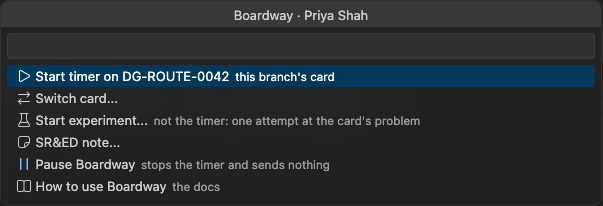
| Item | What it does |
|---|---|
| Stop timer | Stops your running timer. |
| Start timer on... | Starts your timer on the branch's card, or the card you used last. |
| Switch card... | Lists your cards, with the branch's card first. |
| Start experiment... / End experiment | One attempt at the card's problem. See Experiments. |
| SR&ED note... | An Obstacle, Tried or Learned note on the card. See SR&ED notes. |
| Open the card in Boardway | Opens the running card in your browser. |
| Pause Boardway / Resume Boardway | Stops the timer and sends nothing until you resume. |
If you walk away
When you haven't been seen for a while (your company sets how long), the timer stops when you were last seen and the editor asks what the gap was, the same question the board asks.