Set up your people
Match each person in Boardway to Sredify by email, so their SR&ED time goes to the claim, and fix anyone who can't send.
3 min read · Updated Nov 21, 2026
On this page
Boardway has no list of its own to match people against Sredify. It matches each person by email: the email they sign in to Boardway with has to be the Work email on their person in Sredify. Capitals and spaces don't matter.
Before you start
You need to be an Admin in Boardway to see Settings, Sredify. Changing people in Sredify needs a Sredify Admin.
The checklist
For each person whose SR&ED time should go to the claim:
Add them in Sredify
In Sredify, go to Account, People and add them, or open their person. Fill in Work email with the email they use for Boardway. A person with no Work email can't be matched.
Tick them on the project in Sredify
Open the Sredify project's side panel, pick its Settings tab, and tick them under Who works on this project?. Someone Sredify links to a GitHub author with commits in the project's repos counts too.
Invite them to Boardway
Invite them with that same email: see Invite people. They show up in Boardway once they've joined, not while the invite is open.
Add them to the Boardway project
They must be on the linked Boardway project (its People tab) to log time on its cards. Import adds everyone on the Sredify project's team who is already in your Boardway company. Link adds nobody, so add them yourself.
Check Settings, Sredify, People
Each person shows a line per linked project. Sends SR&ED time means you're done.
Do the Sredify steps first if you can. If someone approves days before they can send, those days wait in Boardway and go on their own once it's fixed.
What each line means
Say DG has linked ROUTE to Route engine in Sredify. Under People Dana sees:
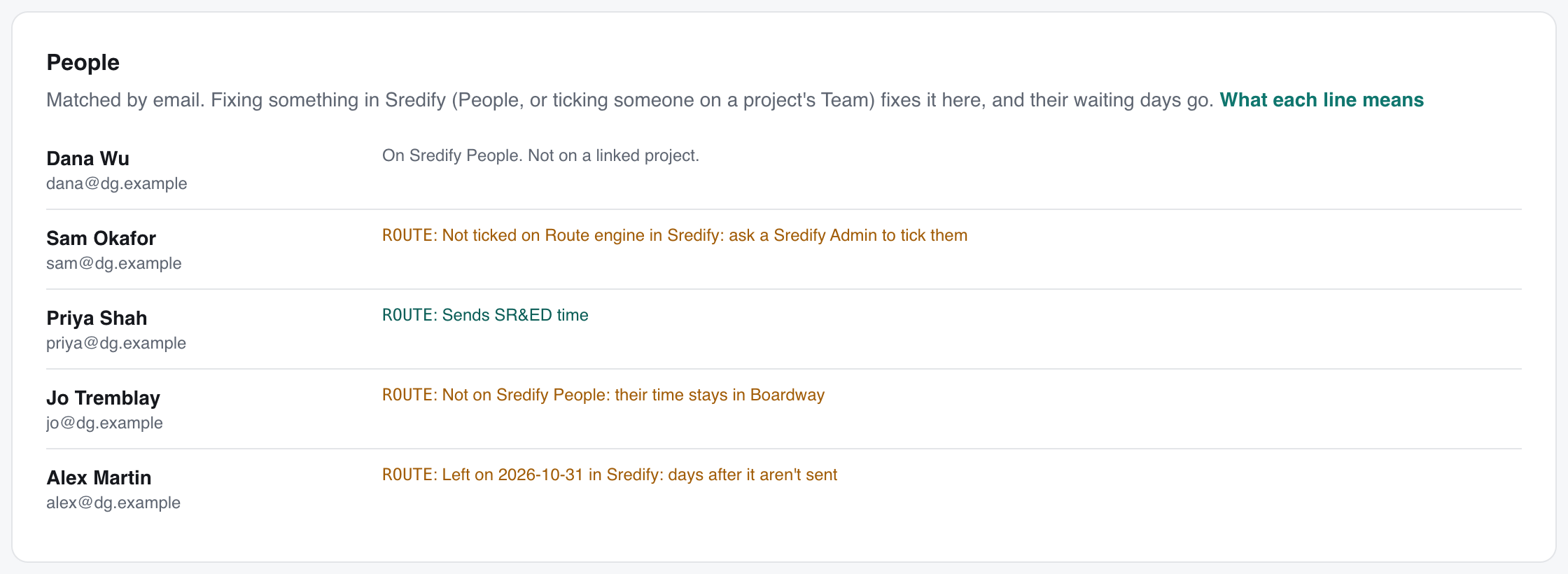
- Sends SR&ED time (Priya): same email in both apps, and ticked on Route engine. Nothing to do.
- Not ticked on Route engine in Sredify (Sam): he's on Sredify People but not on the project. A Sredify Admin ticks him under Who works on this project?.
- Not on Sredify People (Jo): Boardway has
jo@dg.example, Sredify hasjo.tremblay@dg.example. Change Jo's Work email in Sredify tojo@dg.example. - Left on 2026-10-31 in Sredify (Alex): Sredify has an end date for Alex. Days up to the end date still go; later days stay in Boardway. Nothing to do if the date is right.
- On Sredify People. Not on a linked project. (Dana): she isn't on ROUTE in Boardway. Nothing to do, unless she works on ROUTE: then add her to the project.
A "Not ticked" line can be wrong in one case: Sredify also counts a GitHub contributor with commits in the project's repos, and Boardway can't see that. Boardway tries the send anyway, and the line turns to Sends SR&ED time once Sredify takes it.
Two emails for one person
Boardway can't join two emails into one person. If someone signs in to Boardway with a different email than the one on their person in Sredify, change their Work email in Sredify to the Boardway one. Don't add them a second time in Sredify: that splits their hours across two people in the claim.
After you fix something
Sredify tells Boardway when People or a project's team changes, and Boardway also checks every hour. To pick it up now, click Sync now in Settings, Sredify. Days that were waiting for that person then go, and the reason disappears from Not sent yet.
Nothing goes for a day the person hasn't approved, and only time on SR&ED cards: see What gets sent to Sredify.
Who doesn't count
- Turned off people in Boardway don't show here. What they already sent stays in Sredify.
- Guests send like anyone else if they log time on a linked project and are on Sredify People. Contractors set up in Sredify count; Sredify claims them as contractors.
- People only in Sredify (not in Boardway) don't show here. Their time comes from Sredify itself, not from Boardway.