Write the SR&ED fit
Write a card's uncertainty and hypothesis, use Suggest for drafts, and fix what the Check finds.
3 min read · Updated Nov 6, 2026
On this page
What the SR&ED fit is
The SR&ED fit panel on the card page holds two lines, written before the work starts:
- Uncertainty: the technical thing you don't know how to do yet, as a question.
- Hypothesis: what you'll try and the result you expect, with a number.
It shows on cards of an SR&ED project switched to SR&ED or Not sure. Both lines are optional. Until a card has a hypothesis, the board shows No hypothesis yet on it while it is in To do or Doing.
Where the AI gets its words
Suggest reads only this card's saved title and description. The Check reads the same, plus your two lines. Nothing comes from other cards. If suggestions aren't set up for your company, the panel says so and you write the lines yourself.
Get a suggestion
Save the description first
Suggest reads the saved card, so save any change to the description before you start.
Click Suggest from title and description
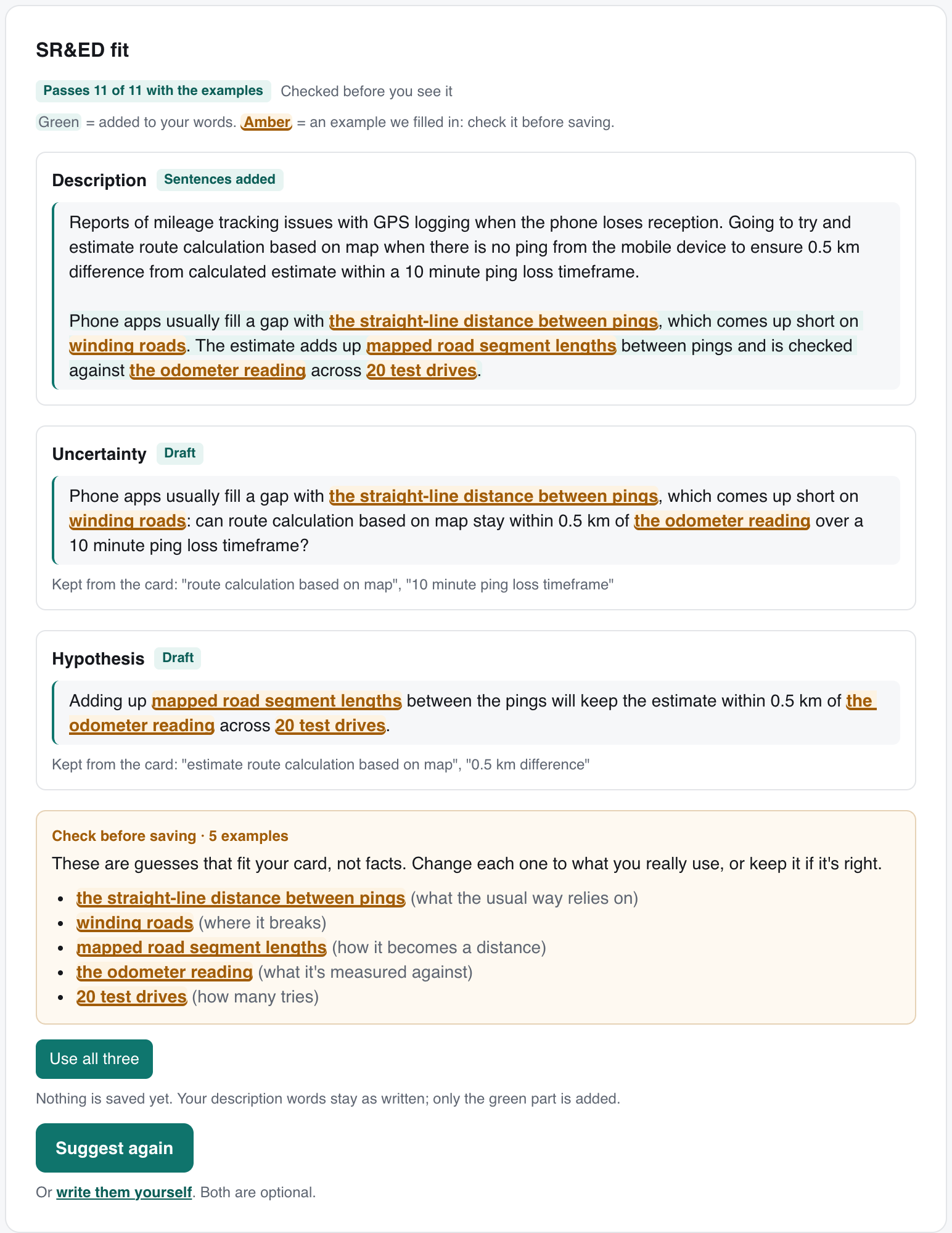
It drafts both lines, checks them against all 11 checks and fixes what fails. It takes about 30 seconds.
Read the drafts
Each draft lists the words it kept from the card. A label such as Passes 10 of 11 says how the drafts did on the checks. Green text is sentences added to the end of your description; your own words are never reworded.
Click Use all three
Or Use both, or Use this draft. The text goes into boxes you can edit. Nothing is saved yet.
Amber examples
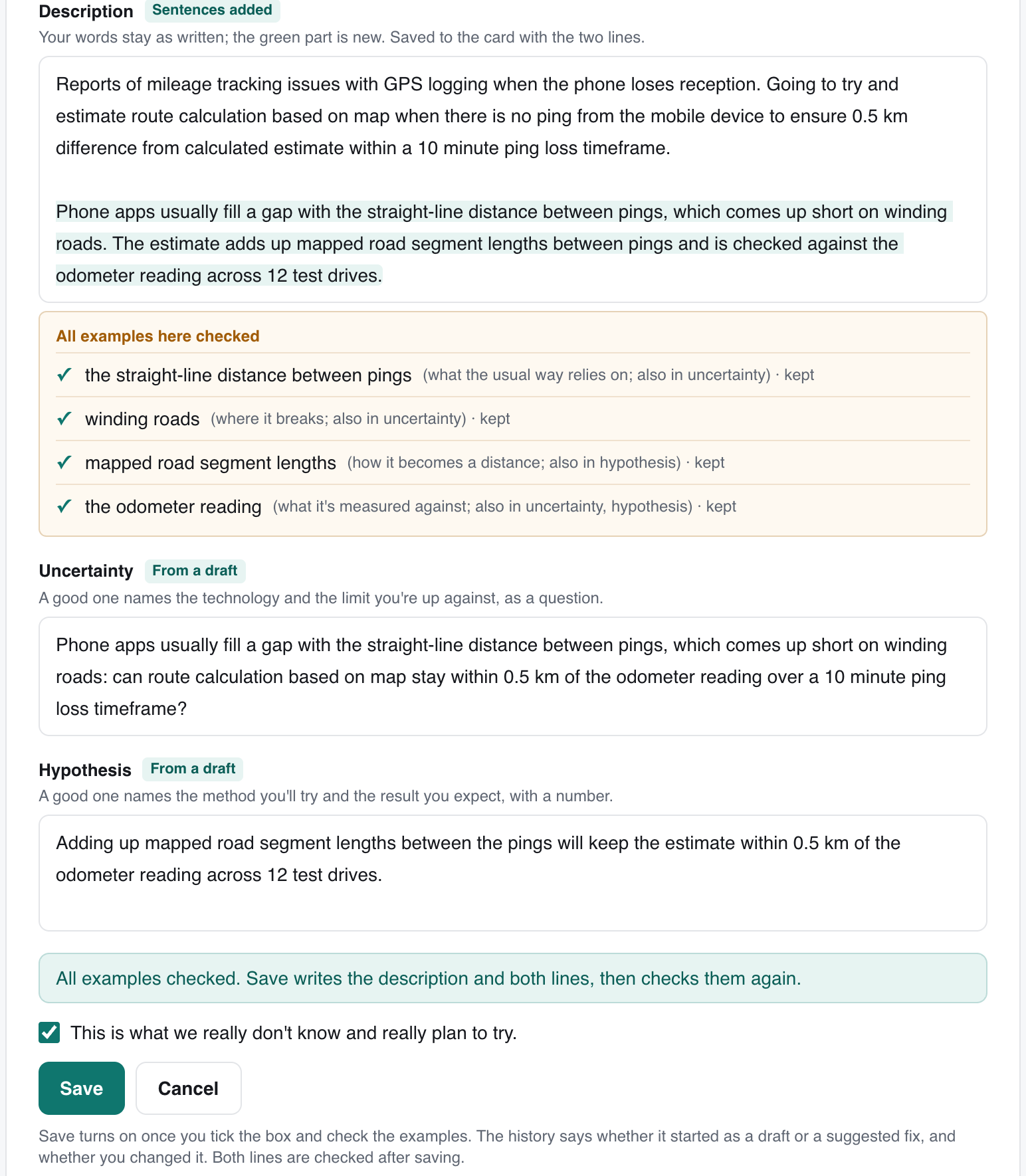
When a check needs a fact the card doesn't say, Suggest fills one in as an example and highlights it amber, for example a test size or a target number. These are guesses, not facts. Under each box, Check before saving lists them:
- Keep it if it's right.
- Change it to what you really use, then Change everywhere. The new value replaces it in every box at once.
Save stays off until every example is kept or changed, and until you tick "This is what we really don't know and really plan to try."
The Check
After you save both lines, Boardway checks them. Click Check again any time. The pill reads All 11 pass or, for example, 2 to fix · 9 of 11 pass. It counts checks only: it never scores the card or says it qualifies for SR&ED.
Each failing check shows a To fix box with what's missing, often with a Rewrite example built from your own words. Examples are for reference: nothing is changed for you. If the card changes, the Check says so: check again.
Suggested revision
When checks fail, Suggested revision rewrites both lines together to answer them. Facts only you know show as [blanks]. Click Use this line or Use both lines, then fill every blank: Save stays off while a blank is left. The revision never changes the description, so add the new facts there too.
Routine work gets no suggestions
If the card reads as routine work, Suggest says there's nothing to suggest, and the Check shows only that question. An unknown can't be written for you. If the work is routine, click Mark Not SR&ED, or Mark Not sure (flags the Lead) to let the Lead decide.
The card's history records whether the lines started as a draft or a suggested fix, and whether you changed them.