Connect Sredify
Connect your company to Sredify once, link each SR&ED project, and see who can send time.
3 min read · Updated Nov 8, 2026
On this page
Sredify is where your SR&ED claim is built. Once Boardway is connected, each approved day's SR&ED time goes to Sredify on its own. Boardway works the same without it.
Before you start
You need to be an Admin in Boardway. Only Admins see Settings, Sredify. In Sredify, only an Admin of your Sredify company can approve the connection.
Connect
Open Settings, Sredify
Go to Settings, Sredify. The panel lists what Sredify will ask you to approve: Company details, People, Projects, Hours (read and record), and Add notes and links. Boardway never asks for pay or for changing hours.
Click Connect Sredify
Boardway sends you to Sredify.
Click Approve in Sredify
Sredify shows the permissions again. If you're in more than one Sredify company, pick the one to connect from the company list (it starts on the company you have open in Sredify). Click Approve (or Cancel to stop). You come back to Boardway with "Connected to" your Sredify company.
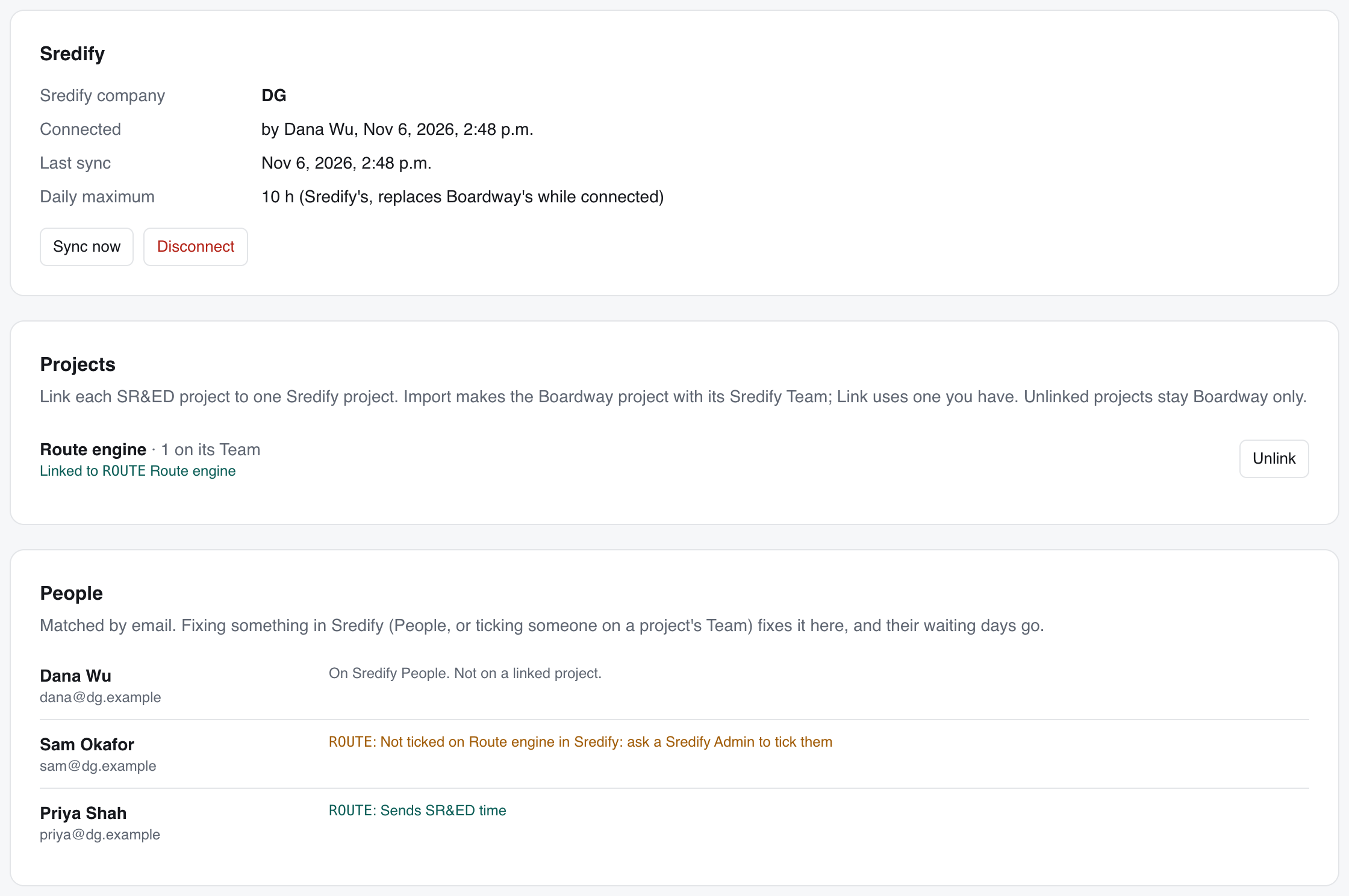
If Connect Sredify is greyed out with "Coming soon", Boardway isn't registered in Sredify yet, so it can't connect.
Link each project
Nothing is sent until a project is linked. Each Boardway project links to one Sredify project, and each Sredify project to one Boardway project. Under Projects, each Sredify project has two buttons:
- Import makes a new Boardway project from it. Type the Project key (for example ROUTE) and click Import Route engine. Everyone on its Sredify Team who is in your Boardway company is added, SR&ED is switched on, and you become its Lead.
- Link uses a Boardway project you already have. Pick it from the list and click Link to Route engine. Linking switches the project's SR&ED on.
Unlink stops new sends for that project. What was already sent stays in Sredify.
Days approved before the link
If people already approved SR&ED days on the project before you linked it, Boardway asks once: for example "14 approved days on ROUTE from before the link". Pick one:
- Send them: they go with their real approval dates. Days in a period locked in Sredify are left out.
- Keep them in Boardway only: nothing from before the link goes.
Your answer is logged in History.
Who can send
Under People, Boardway matches each person to Sredify by email. To send SR&ED time on a linked project, a person must be on Sredify's People list and on that project's Team in Sredify. Each person shows "Sends SR&ED time" or why not, such as "Not on Sredify People" or "Not ticked on" the project. Fix it in Sredify and Boardway picks it up, and their waiting days go. Every line and its fix, plus a checklist for new people: Set up your people.

Not sent yet and Retry
Days that couldn't go are listed under Not sent yet, with the reason. Click Retry (or Sync now) to try again. Boardway also retries every hour.
Disconnect
Click Disconnect and confirm. Nothing new goes to Sredify. What was sent stays there, and Boardway keeps all its own data. Connecting the same Sredify company again picks up where it stopped.
To connect a different Sredify company (for example a demo company), unlink every project first. While disconnected, your linked projects stay listed under Linked projects, each with Unlink. Then click Connect Sredify and pick the other company in Sredify.