The timer
Start, switch and stop your timer on a card, and answer the away question when you come back.
3 min read · Updated Nov 6, 2026
Boardway has one timer per person. It runs on one card at a time and records the minutes you work on it.
Start the timer
There are two ways to start it:
- Move a card to Doing. If the card is yours, or nobody's, your timer starts on it. A card with nobody on it becomes yours. You see "Moved to Doing. Your timer is on it."
- Press Start timer. Use Start timer on the card page, or the small play button on the card on the board.
Moving someone else's card to Doing never starts a timer. When Sam tidies the board and drags Priya's DG-ROUTE-0042 into Doing, nobody's hours change.
Who can log time on a card
Anyone on the project can put their own time on any of its cards, even when the card belongs to someone else. Priya owns DG-ROUTE-0042 "GPS drift fix", and Sam can still press Start timer on it while they pair. Each person's time stays their own. Admins add themselves to the project first: SR&ED hours belong to the project's team.
The timer bar
While your timer runs, a green bar sits under the header on every page, phone too. It shows the card key and title, the time so far, and Stop. Click the key to open the card.

After you stop, the bar can offer Start DG-ROUTE-0042 again for a card you worked on in the last two hours.
Switch cards
Start the timer on another card and the first one stops in the same instant. You never have two timers running, so you never get overlapping time from switching.
Stop the timer
The timer stops when:
- you press Stop in the timer bar, or Stop timer on the card page or the board card
- the card leaves Doing (moved to Stuck or Done) or is archived: this stops everyone's timer on that card
- you are away (below)
The away question
An open Boardway tab tells Boardway you're still here every 15 seconds while you can see it, and about once a minute when it's hidden. A connected editor or browser extension counts too, while you type or read a research page. If Boardway hears nothing for the Away after time (15 minutes unless an Admin changed it in Settings, Time), your timer stops at the last time it saw you. Closed laptops don't pile up hours overnight.
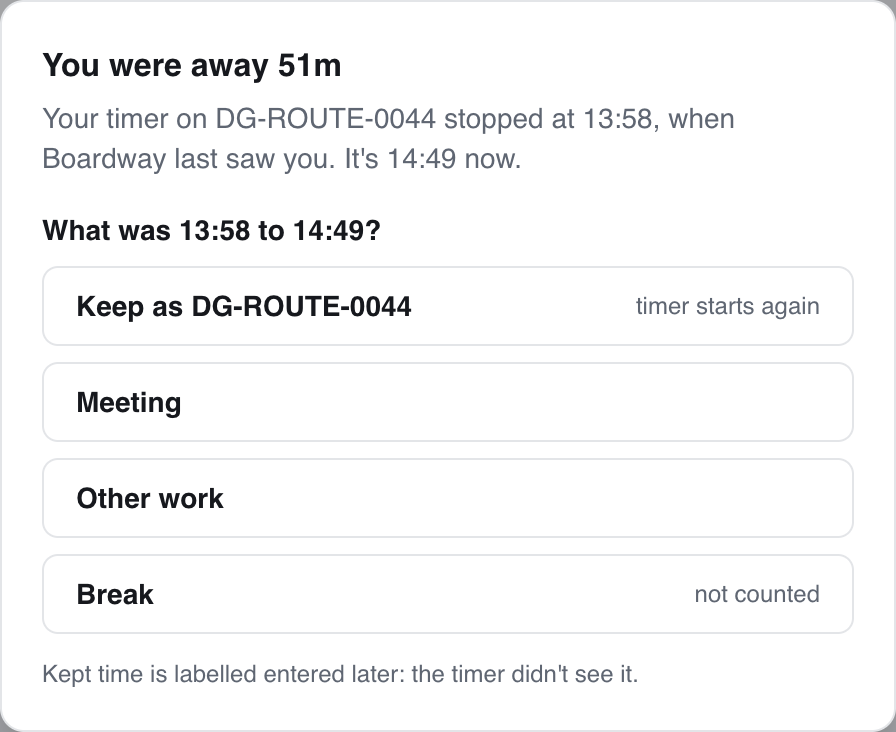
When you come back, Boardway asks: "You were away 50m. Your timer on DG-ROUTE-0042 stopped at 11:10, when Boardway last saw you." Then "What was 11:10 to 12:00?" with these answers:
| Answer | What happens |
|---|---|
| Keep as DG-ROUTE-0042 | The away time goes on the card and the timer starts again |
| Meeting | The away time is added as a meeting |
| Other work | The away time is added as other work |
| Break | Nothing is added (not counted) |
Meeting and Other work only show when the timer was on a card. Kept time is labelled entered later, because the timer didn't see it. If you come back on another day, you just press OK and sort the time in Your day.